How to connect Shopify to STUDIO
Connect your Shopify store, choose where fans check out, and verify products, inventory and orders before launch.
STUDIO connects to your existing Shopify store through a custom app built by EVEN. Your catalog, warehouse and fulfillment partner can stay in place. If you need EVEN to handle shipping, discuss it with your team. This integration covers physical products and orders; music delivery is handled separately.
Choose your checkout model
EVEN checkout
Fans pay on the artist’s STUDIO site. EVEN imports your products, checks stock live at checkout and sends paid orders to Shopify for your existing team to fulfill. EVEN is the merchant of record and handles payments, tax, refunds and fan support. No API token, theme code or developer is needed from your team.
Shopify checkout
Buy buttons on the artist’s STUDIO site open your Shopify checkout. Your store remains the seller and handles payments, tax, refunds and returns. EVEN reads the resulting orders and customer details to support fans and their profiles. This model also needs a public Storefront API access token.
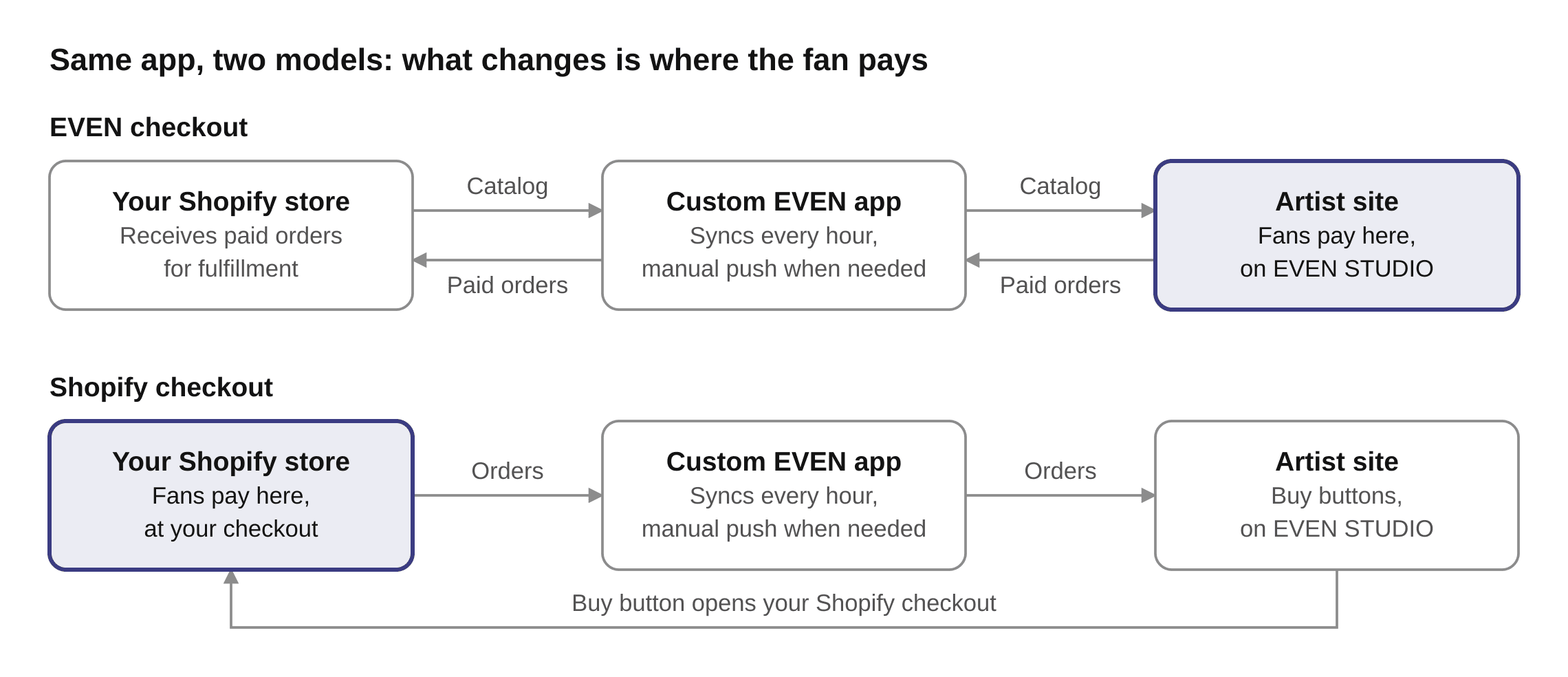
View the checkout flow diagram full size →
Before you start
Share your store address with EVEN, in the format yourstore.myshopify.com, and confirm which checkout model you want.
Have the store owner or a staff member with permission to install apps available to approve the connection.
Make products active and give every variant a unique SKU. Confirm the catalog, prices, stock counts, shipping rates and selling territories.
For EVEN checkout, decide whether EVEN orders should decrement Shopify inventory. Inventory decrements are off by default; agree this setting with EVEN before launch.
1. Install the custom app
EVEN builds a custom app for your store and makes it available in STUDIO, with same-day setup once the required store information and access are ready.
In your STUDIO dashboard, open Merch and select Install.
On Shopify’s approval screen, review the permissions and approve the app using an account allowed to install apps.
Return to STUDIO and check that the dashboard shows the store as connected. Work with EVEN to verify that product and variant SKUs match.
For EVEN checkout, the connection setup is complete. Continue to the pre-launch checks below. For Shopify checkout, complete the additional step first.
2. Add a public token for Shopify checkout
In Shopify admin, open the Headless sales channel. Install it first if it is not already available.
Create or select the storefront for this connection, publish the release products to that Headless sales channel, and open its Storefront API settings.
Copy the public Storefront API access token and send it, along with the product handles for the release, to your EVEN team.
EVEN connects the buy buttons to Shopify checkout. Review the resulting checkout flow before launch.
Use the public Storefront API token for this step. Your team does not need to send an Admin API token or a private Storefront API token.
Shopify: manage Headless storefronts and API access →
What syncs and when
The app syncs hourly. EVEN can also trigger a manual push. Live stock checks at EVEN checkout are separate from that hourly sync. The STUDIO dashboard’s five-minute data refresh does not mean Shopify imports run every five minutes.
Catalog, both models: product titles, images, descriptions, variants, SKUs and prices flow from Shopify to EVEN on the next sync.
Stock, EVEN checkout: stock is checked live when the fan checks out, and out-of-stock items stop selling. Confirm the inventory-decrement setting with EVEN.
Orders, EVEN checkout: paid orders flow to Shopify marked paid and tagged EVEN, with matching SKUs and the customer and shipping details needed for fulfillment.
Orders, Shopify checkout: EVEN reads orders placed through the STUDIO buy buttons and the associated customer details.
Fulfillment, both models: fulfillment status and tracking flow from Shopify back to EVEN. Your existing fulfillment partner stays in place unless you arrange shipping with EVEN.
For EVEN checkout, orders placed before the app was installed can be backfilled in one pass. The STUDIO dashboard shows each order’s sync status: synced, pending, failed or skipped.
Verify the connection before launch
Confirm the correct store is connected and every release product, price and variant appears as expected.
Reconfirm stock counts and, for EVEN checkout, whether Shopify inventory should decrement when an EVEN order is created.
Review the password-protected staging link with EVEN and confirm that buy buttons lead to the chosen checkout.
With EVEN, verify order routing, the Shopify fulfillment queue and tracking updates. For EVEN checkout, each order is created with Shopify’s order confirmation off. Fulfill those orders without customer notification to keep Shopify shipping emails off as well; EVEN handles fan communications.
Payments, refunds and chart reporting
With EVEN checkout, EVEN remits campaign revenue to the partner, and the EVEN fee is settled back. Payout report line items can be traced to their matching Shopify orders. When EVEN cancels or fully refunds an order that has not shipped, the corresponding Shopify order is cancelled automatically. Shipped orders follow the returns process: EVEN authorizes the return and refunds the fan, the item returns to the partner’s warehouse, and the refund is netted against the original order.
With Shopify checkout, your store collects the revenue and uses its normal Shopify reporting. Your store is responsible for refunds and returns; EVEN can help with fan support using the order information it receives.
For both checkout models, physical chart reporting stays with the fulfiller. EVEN handles digital reporting.
Permissions and access
EVEN checkout requests read_products, read_inventory and write_orders. The order-writing permission includes order reading and is used to create paid orders and cancel unshipped ones.
Shopify checkout requests read_products, read_orders and read_customers, plus the public Storefront API token described above. The custom app is read-only in this model.
In both checkout models, Shopify limits order access to orders created in the last 60 days. Campaigns with older orders, including long pre-orders, need read_all_orders, which Shopify approves separately. Without that access, EVEN cannot read tracking on—or cancel—orders older than 60 days.
The app is scoped to your store and does not edit products, prices or store settings. With EVEN checkout, its only writes are creating orders and cancelling unshipped ones; with Shopify checkout, it is read-only. Access tokens are encrypted at rest. Uninstalling the app immediately revokes access. Ask EVEN for the security review package if your team needs it.
Troubleshooting
Install is unavailable or approval fails
Check that EVEN has the correct myshopify.com address and has prepared the app for that store. Have the store owner or an authorized staff member approve the installation.
A product is missing or a change has not appeared
Check that the product is active and its variants have unique SKUs. For Shopify checkout, also confirm the product is published to the connected Headless sales channel. Allow for the hourly sync, or ask EVEN to trigger a manual push.
An order is pending, failed or skipped
Check its sync status in STUDIO and confirm the product SKUs match Shopify. Contact EVEN with the store address, order reference and status. Do not recreate the order manually until the team checks it, to avoid a duplicate.
A Shopify checkout button is not working
Confirm that EVEN has the correct public Storefront API token and product handles, and that the products are published to the connected Headless sales channel. Share the affected page and product with support.
Need help connecting?
Send your Shopify store address, chosen checkout model and any affected product or order reference to studio@even.biz. Your EVEN team will help you complete setup.
Connect your artist domain to STUDIO →
How music is delivered to EVEN →
Updated September 30, 2026.
Still need a hand?
Tell us what you’re working on. The Studio team can help with your next step.